Baseline
 SHARED GROUND LINE
16
Extract frames to preview the animation.
SHARED GROUND LINE
Outer padding surrounds the complete sheet. Transparent room stays inside every cell.



The lime gutter represents inter-cell spacing. It is skipped during cutting.
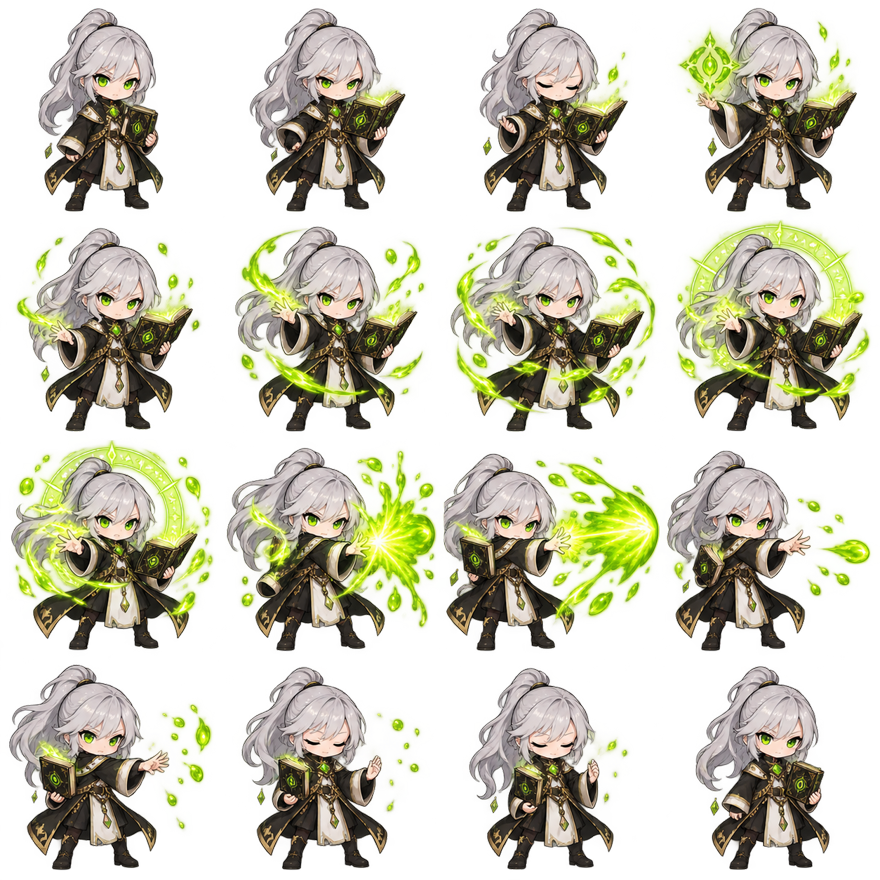
A 16 frame sprite sheet stores sixteen chronological animation images inside one texture. In this example, four columns and four rows create a square layout. Frame 01 begins at the top left, frame 04 ends the first row, frame 05 begins the second row, and frame 16 ends at the bottom right. A renderer calculates one cell and advances through that row-major order.
The visible magic-cast action uses the same original silver-haired character as the rest of Sprite Sheet Maker. Early cells establish the pose, middle cells grow the acid-lime effect, and later cells complete the recovery. The sheet is a product teaching asset rather than a copy of a commercial game character or an unlicensed sprite download.
Sixteen is not a universal requirement. A blink might need three frames, a walk could use eight, and a cinematic effect might need more than thirty. A 16 frame sprite sheet is valuable because it provides enough temporal resolution for a complete stylized action while remaining small enough to inspect, cut, reorder, and preview in the browser.
The frame counter in the animation preview connects the moving image to the numbered cells. Pause during the effect peak, step forward or backward, and locate the same drawing in the breakdown. That habit makes it easier to diagnose timing and grid errors in any 4x4 sprite sheet you receive or generate.
A 4×4 layout is compact and visually balanced. If every cell is square, the complete sheet is square too. Square outputs fit common image generation models, preview panels, texture viewers, and documentation layouts. The homepage includes a dedicated 4×4 preset, and the AI generator uses the same fixed contract so slicing never depends on a guessed frame count.
A horizontal sixteen-frame strip can become very wide. It may be easy to read but awkward to inspect on mobile, import into some tools, or pack near texture-size limits. Four rows keep the width under control. The tradeoff is that the importer must know both columns and rows and preserve row-major sequence order.
Four columns also create natural visual checkpoints. Frames 01–04 can establish anticipation, 05–08 can build the action, 09–12 can reach the peak, and 13–16 can recover. That division is not a mandatory timing formula, but it helps artists inspect whether the action develops instead of producing sixteen unrelated poses.
Use a different layout when the destination requires it. Some engines prefer strips, some atlas pipelines add metadata, and some texture budgets favor dimensions near a power of two. The 16 frame sprite sheet tools can repack the same extracted cells into another column count without redrawing them.
Baseline alignment keeps the character’s relationship to the ground stable. The visible feet may change during a jump or attack, but the cell coordinate system should remain consistent. This example bottom-centers source frames inside equal cells. The character does not get independently cropped and recentered for every pose, which would create a distracting wobble.
Spacing is the gutter between cells. Padding is the margin around the outer edge of the complete texture. Both are zero in many engine-ready sheets because cell geometry already separates content. Add spacing when filtering could sample a neighboring cell or when a destination importer expects a gutter. Add padding only when the target format or atlas requires an outer margin.
Internal transparent room is different from spacing. The magic effect expands inside its assigned cell; that empty area remains part of every frame. If the visible content were trimmed tightly, each frame would have different bounds and the animation would jump. A clean 4x4 sprite sheet uses one cell size large enough for the most expansive pose or effect.
Use the cutter when spacing or offsets are uncertain. Its numbered overlay makes every source rectangle visible before extraction. Use the animator afterward. Motion reveals a one-pixel shift more clearly than a static grid, especially around a bright effect, weapon tip, or character outline.
Transparent PNG is the normal master format for a character 16 frame animation. It lets a game draw the sprite over different maps, lighting, and interface surfaces. The checkerboard shown by this site is only a preview pattern; it is not part of the PNG. Confirm transparency by switching the animation preview between checkerboard, dark, and light.
Soft semitransparent effects work in PNG, but they may change when converted to GIF because GIF transparency is binary and its colors are indexed. Keep the PNG sheet as the production source. Use GIF only as a convenient review file, documentation preview, or message attachment after checking the encoded edges.
When exporting from the maker, verify output size, columns, rows, frame count, padding, and spacing. A 16 frame sprite sheet with 256-pixel cells and no gutter becomes 1024 by 1024 pixels. Add two pixels of spacing between four columns and the width grows by six pixels; add eight pixels of outer padding and it grows by another sixteen.
Try 4×4 / 16 Frames on the homepage to build the same structure from your own authorized images. Empty cells remain empty when fewer than sixteen frames are supplied, and extra images are not silently copied. Preview the animation, correct order or baseline problems, then export the transparent PNG used by your engine.
A 16 frame sprite sheet normally uses row-major order: left to right across each row, then top to bottom. Cells 1–4 form the first row and 13–16 the last.
No. A 16 frame sprite sheet can be 16×1, 8×2, 4×4, or another grid. Four by four is compact, square, and predictable.
Choose a cell large enough for the widest and tallest pose at one consistent scale. Common sizes include 32, 64, 128, and 256 pixels, but art style and target platform decide.
Do not independently trim and recenter frames unless you preserve alignment metadata. Equal cells with a shared baseline are usually safer for character animation.
Start at zero when the engine uses nearest-neighbor sampling and exact UVs. Add a small gutter when filtering, mipmaps, or the importer can sample adjacent cells.
Yes. The preview above loads all sixteen original frame files. You can play, pause, step, change FPS, loop, reverse, ping-pong, and switch backgrounds.
The AI generator requests a fixed square 4×4 output and then slices it into sixteen cells. Review consistency carefully because generated details may change between frames.
Prepare sixteen consistent images, open the homepage maker, choose 4×4 / 16 Frames, arrange row-major order, set baseline and spacing, preview, and download PNG.