



what is a sprite sheet

What Is a Sprite Sheet?

What is a sprite sheet? Learn how sprite sheets store animation frames, how rows and columns define cells, where games use them, and how they differ from GIFs.

FRAMES

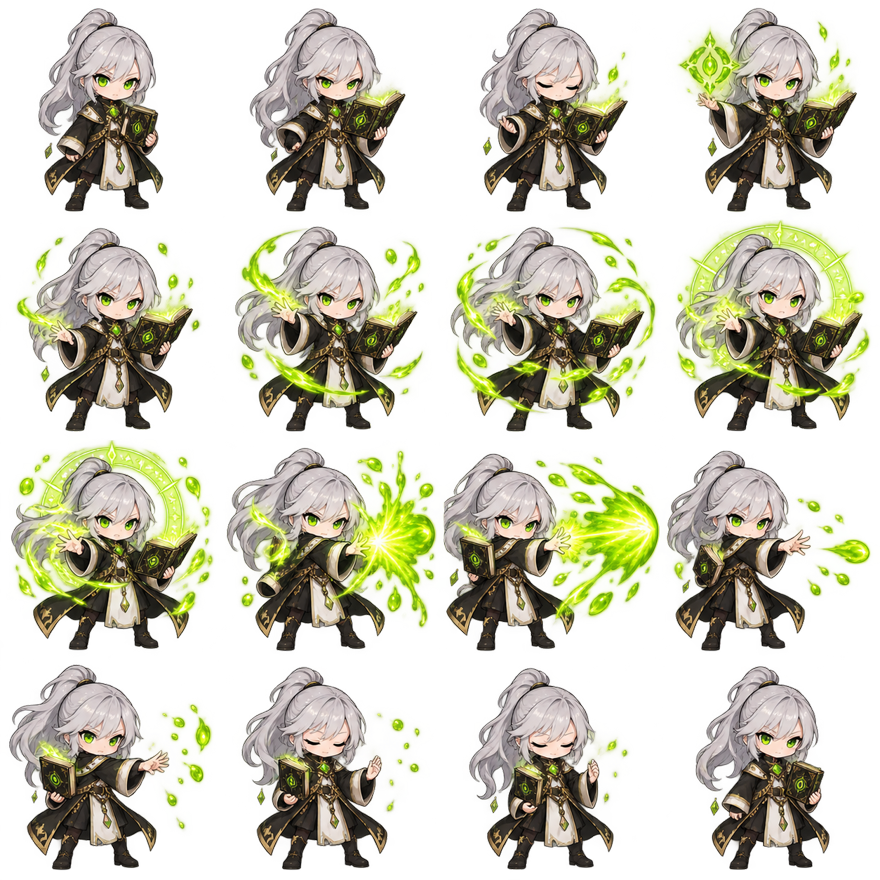
Original 4 by 4 game sprite sheet showing sixteen chronological magic-cast frames

4 × 4

RUNTIME GRID → ANIMATION

Upload your own PNG, JPG, or WebP frames, arrange the grid, test animation, and export a real sheet while the concepts are fresh.

Make a Sprite Sheet
PRACTICAL NOTES

What Is a Sprite Sheet? A Simple Example

What is a sprite sheet in practical terms? It is one image that contains several smaller images arranged in known cells. Those cells may show animation poses, tiles, icons, particles, or interface states. A program loads the texture once, calculates the rectangle for one cell, and draws only that rectangle. Changing the chosen rectangle creates animation without replacing the complete image file.

The 1024 by 1024 example above has four columns and four rows. Each cell is 256 by 256 pixels, giving sixteen sprite frames in row-major order. Frame 01 is at column one, row one. Frame 05 begins row two. Frame 16 sits at column four, row four. The transparent area around the character is still part of every cell and keeps scale and alignment stable.

A game sprite sheet does not contain playback rules by itself. The PNG knows pixels, width, and height; code or metadata supplies columns, rows, frame order, timing, looping, and state transitions. The same sheet could play at 6 FPS for a heavy spell or 12 FPS for a quick effect. It could stop on frame sixteen or ping-pong back through the sequence.

This is the core answer to what is a sprite sheet: the image stores visual states, while the runtime decides which state appears and when. Interactive control makes the format useful for responsive games.

What Is a Sprite Sheet and How Does It Work?

A renderer first knows the complete texture size and the cell geometry. With equal cells and no padding, frame width equals sheet width divided by columns. Frame height equals sheet height divided by rows. For a 512 by 256 image with eight columns and four rows, each frame is 64 by 64 pixels. An engine converts the desired index into a row and column, then into pixel or UV coordinates.

Spacing and padding extend that calculation. Padding is the margin around the outside. Spacing is the gutter between cells. If a sheet has 4 columns of 64-pixel frames, 2 pixels between columns, and 8 pixels of outer padding, its width is 8 × 2 + 4 × 64 + 3 × 2, or 278 pixels. Guessing 64 by dividing the full width by four would cut the grid incorrectly.

Sprite sheet animation works by advancing an index on a timer. At 8 FPS, the player requests a new frame about every 125 milliseconds. It may wrap to zero for a loop, stop at the last pose, read indices backward, or follow a custom list. The browser animator on this site exposes those rules so a grid can be tested before engine code is written.

Not every atlas is a regular sprite sheet. A texture atlas may pack differently sized rectangles tightly and require JSON or XML metadata for each region. A regular sprite sheet uses a predictable grid, which is easier to create, cut, and animate. The cutter in this product targets regular rows, columns, offsets, and spacing rather than polygon-packed atlas data.

Sprite Sheet vs GIF and Common Uses

A GIF is a self-playing animated image with embedded frame delays and looping information. A sprite sheet is a static texture that exposes frames to application code. GIF works well in a message, document, or web page. A sprite sheet works well when a game must change speed, branch to another animation, stop on a pose, react to input, or draw hundreds of entities from one texture.

The formats can be converted in both directions. GIF to Sprite Sheet reconstructs complete frames from patches, transparency, timing, and disposal instructions, then packs a PNG grid. Sprite Sheet to GIF cuts the grid, previews the order, applies FPS and loop settings, reduces colors to indexed palettes, and produces a shareable animation. The PNG remains the better non-lossy master for game use.

Where are sprite sheets used? Character movement is the familiar case, but the method also fits explosions, spell effects, animated icons, loading indicators, faces in dialogue, cursor states, collectible spins, environment loops, tile variations, and frame-based UI feedback. A tile sheet may not animate at all; it still uses one image with known source rectangles.

Modern engines can also load separate files or build atlases during import. That does not make sprite sheets obsolete. A readable grid remains a portable delivery format, a useful debugging surface, and a compact way to review related images. Choose it when predictable cells simplify the production and runtime workflow.

Sizes, Frames and How to Make One

Common frame sizes such as 32 by 32, 64 by 64, and 128 by 128 describe cells, not complete sheets. A sixteen-frame 64-pixel 4×4 layout is 256 by 256 before gutters. A sixteen-frame 256-pixel layout is 1024 by 1024. The correct sprite sheet size depends on art detail, display scale, frame count, spacing, and target texture limits.

Power-of-two dimensions can still help some engines, mipmapping systems, and older hardware, but they are not automatically required for every 2D project. Do not stretch artwork merely to hit 2048 or 4096. Calculate the real output and check the target importer. The dedicated size guide shows formulas and tradeoffs for larger sheets.

To make a sheet, prepare consistent frame images, keep the subject at one scale, preserve a shared baseline, upload frames, correct chronological order, choose columns, set padding and spacing, preview the animation, and export PNG. The maker bottom-centers differently sized images inside one maximum cell so character feet remain more stable.

That workflow turns the abstract question “what is a sprite sheet?” into a testable artifact. Build a small sheet, open it in the animator, step through each cell, then cut it back into frames. Moving through creation, playback, and extraction shows exactly which information lives in the image and which information belongs to the player.

Questions,
answered.

What is a sprite sheet used for?

When asking what is a sprite sheet used for, think character animation, effects, tiles, icons, UI states, collectibles, and other related images drawn from one texture.

What is a sprite sheet animation process?

The practical answer to what is a sprite sheet animation is: calculate each cell rectangle and advance indices on a timer. FPS, loop, and state changes come from code.

What is a sprite sheet compared with a texture atlas?

A regular sheet normally uses equal grid cells. An atlas may tightly pack different rectangle sizes and needs metadata. Some teams use the terms loosely, so inspect the actual layout.

What is a sprite sheet advantage over GIF?

It is better for interactive runtime control and lossless PNG pixels. GIF is better for a self-playing shareable preview. Many workflows keep a sheet as the master and generate a GIF for review.

What is a sprite sheet frame count based on?

Only the action decides. A blink might use three, a walk eight, and a detailed spell sixteen or more. Choose enough poses to communicate motion without storing redundant frames.

What is a sprite sheet transparency requirement?

Characters and effects usually benefit from transparent PNG. Tiles or UI panels may be opaque. The preview checkerboard is not exported when Transparent is selected.

What is a sprite sheet frame order?

Most regular grids use row-major order: left to right, then top to bottom. Always verify the importer or metadata because custom orders are possible.

What is a sprite sheet inspection workflow?

Use the cutter for a numbered overlay and exact geometry, then the animator for frame order, FPS, loops, reverse, ping-pong, and background inspection.